How to Get GPS Tracker Alerts by Text Message
Set up ShieldGPS text alerts, verify your phone number, and understand which devices and notifications are eligible for SMS delivery.
Text messages are useful when you want an alert to reach your phone without relying on an open app or browser notification. ShieldGPS can send tracker alerts by SMS to the verified phone number on your account. SMS works alongside push and email, so you can choose the combination that suits you.
You need two things before you can turn SMS alerts on:
- at least one tracker on an eligible Unlimited plan; and
- a verified phone number saved to your ShieldGPS account.
Verify the phone number on your account
Open Settings, choose Phone Number, and enter the mobile number that should receive your alerts. After you save a new number, ShieldGPS takes you straight to the verification screen:
- Select Send code. ShieldGPS sends a six-digit code to the number you saved.
- Enter the code and select Verify phone number.
If you leave before finishing, return to Phone Number and select Verify phone number to resume. Verification codes expire after 10 minutes, so it is best to enter the code soon after it arrives.
ShieldGPS sends account alerts to one verified default phone number. Double-check the country code and number before requesting the code, especially if you have recently moved or changed mobile providers.
Enable SMS in Notification Settings
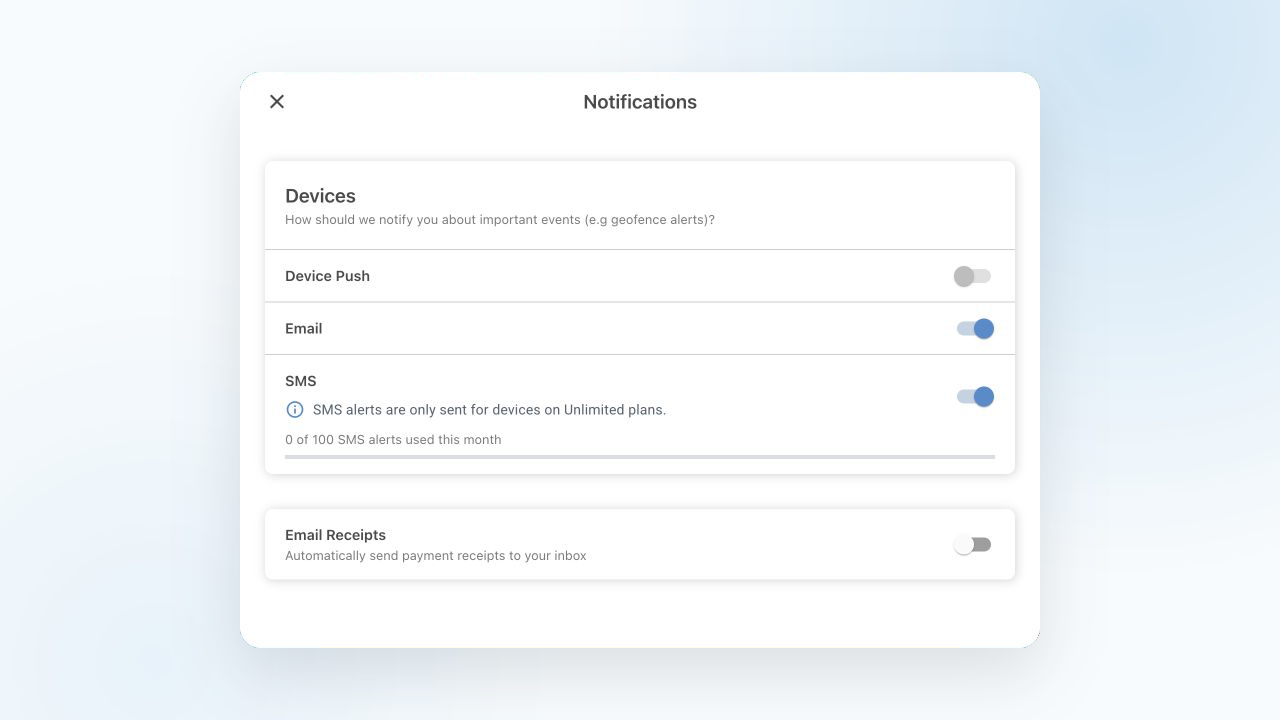
Once your phone is verified, return to Settings and choose Notifications. In the web dashboard, the Devices section has separate controls for Device Push, Email, and SMS. The mobile app handles push registration separately, so its Notification Settings screen shows Email and SMS.
Turn on SMS, review the text-message disclosure, check the consent box, and select Enable SMS alerts. The setting applies to tracker events that you have already enabled, such as a geofence alert. Turning on SMS does not create new alert rules by itself.
If the SMS switch is unavailable, the message below it tells you what is missing. You may need to verify your phone number or have a tracker on an eligible Unlimited plan.
Which trackers can send text alerts?
SMS delivery is checked for the tracker that produced the alert. Only alerts from devices on eligible Unlimited plans can be sent by text. Having one Unlimited-plan tracker makes SMS available for the account, but it does not add SMS delivery to alerts from another tracker on a plan that does not include it.
Each eligible Unlimited-plan device currently contributes 100 SMS alerts per UTC calendar month to one shared account allowance. For example, two eligible devices contribute a total allowance of 200 alerts. Notification Settings shows how many SMS alerts have been used and the current total available to your account.
When that allowance is used, additional alerts are not sent by SMS until the next UTC month. Push and email are separate delivery channels and can continue if you have them enabled.
Keep push and email set the way you want
Enabling SMS does not automatically enable or disable push or email. Likewise, changing the SMS switch leaves the other two settings alone. You can keep email on for a searchable record, use push for quick app or browser notifications, and add SMS for events you want delivered through your mobile carrier.
Text delivery still depends on the tracker reporting the event, ShieldGPS processing it, and the mobile carrier accepting and delivering the message. Messages can be delayed or undelivered, and message or data rates may apply. Replying STOP blocks further ShieldGPS texts to that number through the messaging provider, but it does not turn off the SMS switch in ShieldGPS. Reply START to resume delivery. Do not rely on a tracker alert as an emergency-response service.
After setup, the SMS row in Notification Settings is the simplest place to confirm that text alerts are enabled and to check the allowance available for your current devices.